
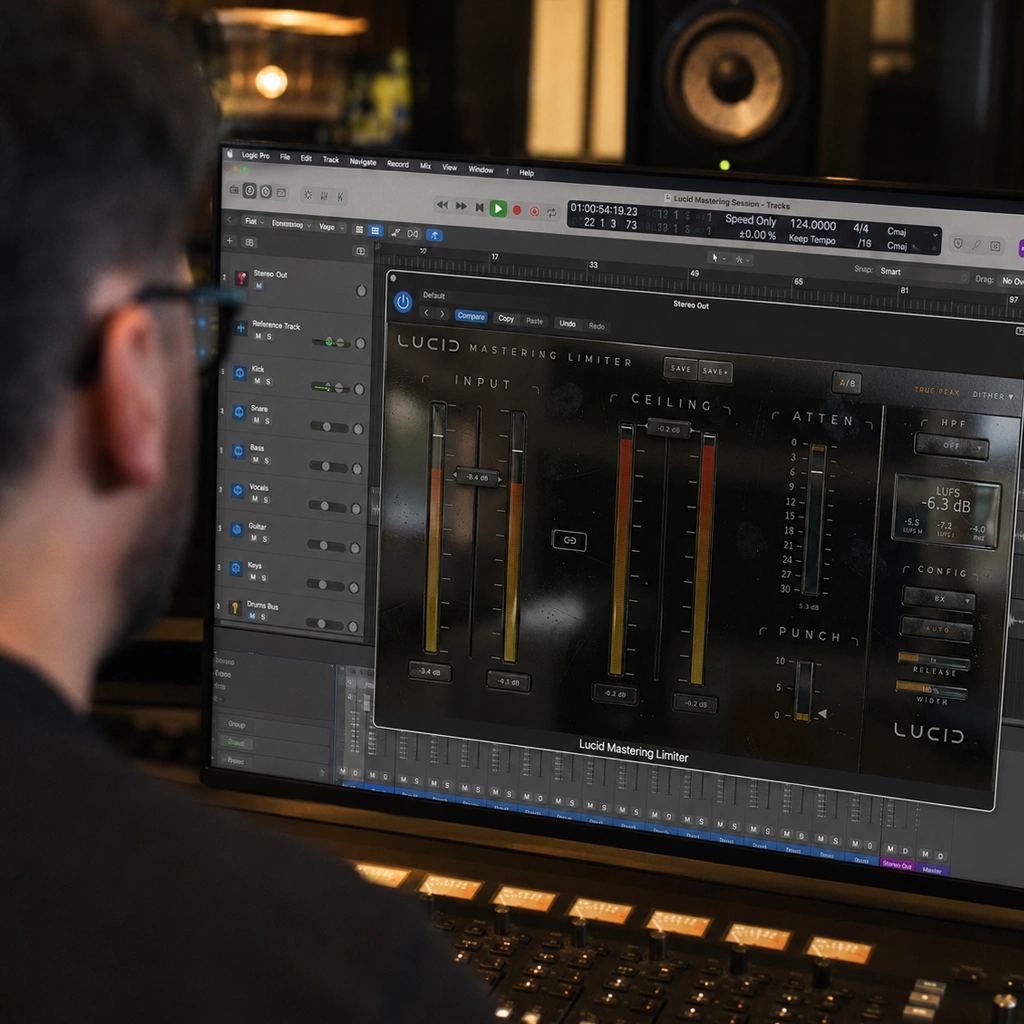
Description
Lucid Mastering Limiter Plugin for Clear, Controlled Peaks
Lucid is a mastering limiter plugin for controlling the final peaks of a mix while preserving its punch and clarity. Use it at the end of your mastering chain to balance perceived loudness with the dynamics that make a track move.
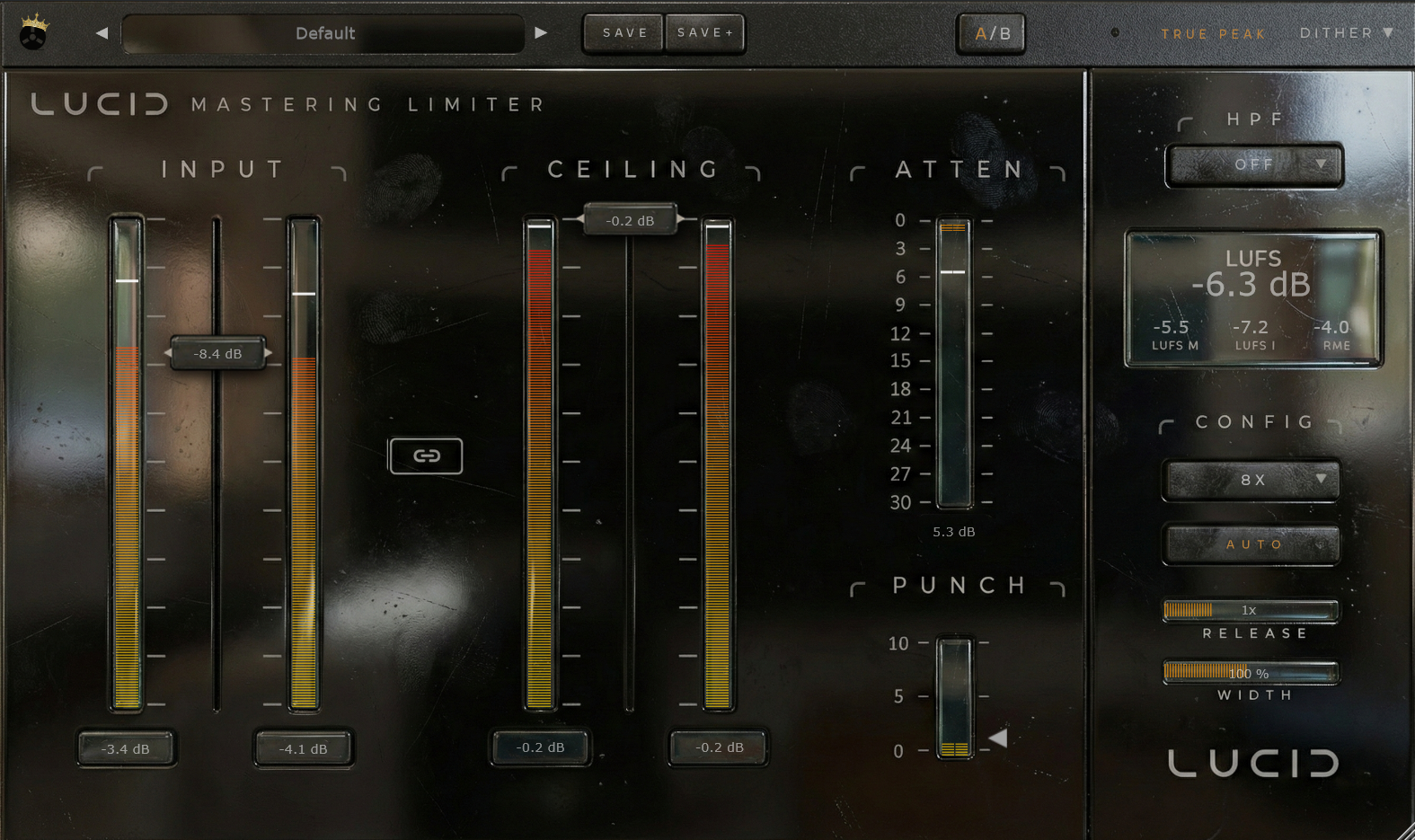
Raise the Standard
The limiter is the final decision maker.
The last processor your music ever touches.
The moment where all the work either survives or collapses.
So we asked a simple question:
Why is the most important processor in the chain still treated like an afterthought?
Lucid was built from the ground up with a single, uncompromising goal:
to be the best mastering limiter ever made.
We think we achieved it. Now you decide.
The End of Compromise
Technology has moved forward.
Studio systems today are more powerful than entire mastering facilities were just a decade ago.
So why are we still limiting ourselves?
Lucid abandons the idea of “good enough.” Every stage of its signal path is maxed out intentionally,
not because it is trendy, but because there is no longer a technical excuse not to.
More precision. More resolution. More intelligence. More control.
If your system can handle it, Lucid will use it.
The Final Tone of Your Masterpiece
A mastering limiter is not just about loudness.
It defines the final tone, impact, density, and emotional weight of your music.
Lucid is designed to do what great mastering limiters have always done, but taken further:
- Preserve punch while pushing level
- Maintain clarity under extreme gain reduction
- Control peaks without destroying micro-detail
- Sound intentional, not defensive
This is not a safety net.
This is the last brush stroke on the canvas.
Built on History. Pushed Beyond It.
Lucid stands on the shoulders of the best mastering limiters ever made.
We studied their techniques, standards, and philosophies, then asked a harder question:
What happens if we remove the traditional CPU constraints entirely?
The result is a limiter that keeps everything engineers love about classic mastering workflows, but with:
- Modern multi-stage envelope control
- Advanced transient recovery
- High-order oversampling up to 64x
- True peak precision designed for today’s delivery standards
- A signal path that prioritizes transparency without sterilization
Nothing is simplified. Nothing is “lightweight.”
Lucid is unapologetically overbuilt.
Precision Without Sterility
Lucid is clean, but never cold.
Transparent, but never lifeless.
Its multi-envelope limiting engine reacts musically to program material instead of flattening it,
while the integrated microdynamics system restores impact that traditional limiters often erase.
Drums stay punchy. Transients stay sharp. Energy stays intact.
Push it gently for invisible control, or drive it hard when loudness matters.
Lucid remains composed where others fold.
Designed for the Final Stage
Lucid is not meant to be stacked ten times across a session.
It is meant to live where it belongs: at the very end.
With true-peak control, linear-phase subsonic filtering, stereo field management, and professional-grade loudness metering built in,
Lucid allows you to finish your master with confidence, not guesswork.
When you print your final file, you should not be wondering what survived.
You should know.
A Living Mastering Tool
We did not set out to make a “version 1” limiter.
We set out to make the best mastering limiter in history.
If you believe it can be better, tell us how.
Lucid is built to evolve. If an improvement can be made, and it makes the limiter better, it will be made.
Submit feedback. Submit ideas. Submit edge cases. Lucid will improve with each update.
This is not a locked product.
It is a standard in motion.
The Final Decision Is Yours
You already have the music.
You already have the mix.
Now give it the final processor it deserves.
A Product people may be using for 10+ years….song and productions using LUCID are already making their way into the charts.
Lucid Mastering Limiter
No shortcuts. No excuses. No compromises.
Hear it for yourself.
Changelog:
12/30/2025: v 1.0.2 – Initial Public Release
01/24/2026: v 1.0.3 – Drastic engine overhaul based on customer feedback. Lucid is now winning shootouts against all major limiter plugins 😉
02/27/2026: v 1.5.0 – Major update addressing license persistence fix, as well as adding many functions for manually entering values and linking
03/08/2026: v 1.5.1 – Further update to license persistence affecting some users
05/26/2026: We have discovered a bug when oversampling is 1x-2x and sometimes 4x on certain systems, we are working on the fix. In the meantime use 8x+. Also some distortion at extreme limiting levels (-3 LUFS+) we will tweak that response as well with the next update.
08/13/2026: MASSIVE overhaul resulting in DRASTIC reduction in cpu+resource usage. Between 93%-500% reduction in cpu and resource usage. As well as many other fixes regarding OS and true peak.
Mastering limiter plugin: Common Questions
Where should a mastering limiter plugin go?
A limiter commonly sits near the end of a mastering chain, after tonal and dynamic adjustments. Listen to the entire mix and leave room for any later processing or format conversion in your delivery workflow.
How should I compare limiter settings?
Match the listening level when comparing processed and unprocessed audio. Listen for changes to kick impact, vocal clarity and sustained sounds rather than choosing a setting only because it is louder.
Explore more audio effects plugins at FlashVST, or visit developer Analog Legends for more about its music software.
Choosing a Mastering Limiter Plugin for Your Final Mix
A mastering limiter is easiest to evaluate when you already know what the mix needs. You may want controlled peaks, a little more average level or a final stage that preserves the punch of the arrangement. Those goals can pull in different directions. Begin with a balanced mix and use this mastering limiter plugin to assess how much limiting the music can accept before its character starts to change in an unwanted way.
Comparing Mastering Limiter Plugin Settings
Choose a passage that contains both strong transients and sustained musical information. A chorus with kick, snare, bass and vocals is often more revealing than a quiet introduction alone. Keep an unprocessed comparison available and listen at similar perceived loudness. A louder version can sound exciting even when the drums have lost impact or the vocal has become less natural.
When testing a mastering limiter plugin, check more than one section of the song. The loudest passage may expose obvious strain, while quieter sections reveal how the dynamics flow. If a setting only works in one section, revisit the mix balance or the amount of limiting. The purpose is a convincing musical result across the track, not a single impressive reading on a meter.
Mastering Limiter Plugin Settings and Drum Impact
Pay attention to the beginning of drum hits and the space between them. If the kick loses definition or the snare feels smaller as you increase processing, compare a more restrained setting. Listen to bass notes, vocal consonants and sustained chords too. Limiting can affect the impression of the whole arrangement, so judge the result as a piece of music rather than as an isolated loudness exercise.
This mastering limiter plugin is designed around controlled peaks with punch and clarity. Use those qualities as listening criteria. A mastering limiter plugin does not need to make every mix equally loud to be useful. Some arrangements benefit from more contrast and movement, while others support a denser presentation. Choose the amount that suits the performance and style.
Preparing Your Mix for a Mastering Limiter Plugin
If one element repeatedly causes the final stage to work much harder, return to that element in the mix. An uneven bass note, a very sharp percussion hit or an excessive low-frequency build-up may be easier to address before the master output. This is often more effective than forcing the mastering limiter plugin to compensate for every imbalance at once.
Use the mastering limiter plugin after the main tonal and dynamic decisions are in place. If you change earlier processing, check the final stage again because its input has changed. Keep an earlier version of the session so you can compare the overall direction rather than only the most recent adjustment.
Checking the Export from Your Mastering Limiter Plugin
Listen to the finished export from start to finish. Check the opening, transitions, quiet passages and ending, and confirm that the file contains what you intended. If your delivery destination has specific requirements, use its current published guidance. Do not assume that one loudness or peak setting is appropriate for every platform, format or client.
Before buying this mastering limiter plugin, compare its workflow and sound with a real example from your own work. Read the format and system requirements, listen to the demos and consider where it would sit in your finishing chain. A useful purchase should solve a clear production need and make consistent decisions easier to repeat.



Reviews
There are no reviews yet.